• Skip to primary navigation
  • Skip to main content
  • Skip to primary sidebar

cros.land

just figuring things out

  • Home
  • Kenji’s Dungeon Master Tools
  • Lost Mines of Phandelver Guide
  • Contact Me
  • Archives

D&D 5e Encounter Generator — Build Encounters Your Players Will Actually Remember

March 7, 2026 by Kenji Leave a Comment

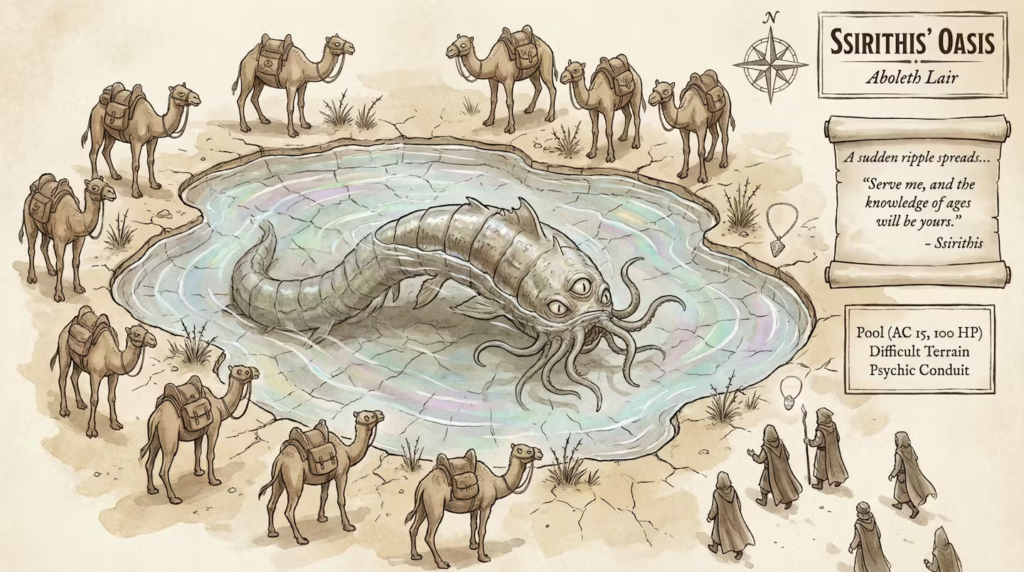
A quiet desert oasis rests beneath a scorching sun, its dark pool reflecting the harsh daylight and a ring of ten camels standing around it. Their bodies are lean and sunbaked, but their eyes hold an empty glaze, distant and unblinking as they sway subtly back and forth. At the pool’s edge, a massive fish-like shape shifts beneath the brackish surface — a hulking, ancient aboleth whose sickly glowing eyes scan without haste. The camels do not graze or drink; instead, they stand unnervingly still, occasionally twitching as if pulled by unseen strings. For a moment, the desert falls silent except for a faint ripple on the water’s surface — and then the gaze of the aboleth seems to reach toward you.

That encounter was generated by throwing an aboleth and ten camels into the generator with no other context. No location, no scene description, just those two creatures. The tool turned the camels into psychic hostages at a desert oasis. The aboleth bargains for servitude, the camels are the reason you can’t just fireball the pool, and the saddlebags link to a merchant house that opens a thread beyond the fight.

What Is This?

Most encounter builders are calculators. You pick monsters, they tell you the CR math, and you’re left to figure out the rest — what the monsters are doing when the party arrives, what happens mid-fight, and what the players find afterward.

This tool generates the actual encounter. You get read-aloud text to narrate to your players, DM notes with tactical positioning and terrain mechanics, a mid-encounter turn that shifts the stakes, and aftermath hooks that connect the fight to the wider campaign.

Pick your monsters, optionally describe a location or situation, and hit generate. That’s it.

How It Works

Every creature in the SRD has enriched data beyond what’s in the stat block. Each one has a tactical identity — how it fights as a whole, what combos it tries to execute. Each one has personality traits that shape the encounter’s tone. Some negotiate. Some flee when wounded. Some fight to the death without a word.

An aboleth negotiates because that’s what aboleths do — they’re ancient psychic manipulators who prefer servitude over destruction. A remorhaz just charges because it’s a mindless predator driven by heat and hunger. The encounters come from the creatures themselves, not from generic templates.

This is what makes the tool different from typing “generate a D&D encounter” into a chatbot. There’s a data layer underneath that knows how 328 SRD creatures behave, retreat, socialize, and what they leave behind when they’re defeated.

Custom Creatures

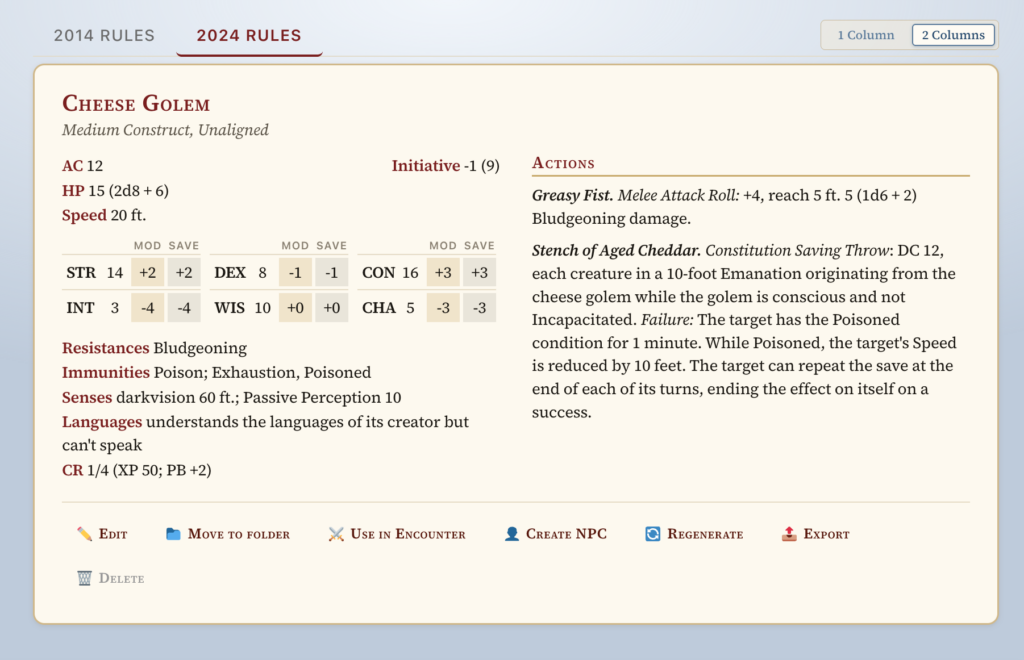
The tool also works with custom stat blocks. You can build your own creatures in the Statblock Generator and add them to encounters alongside SRD monsters.

When you create a custom creature, the tool automatically enriches it with the same tactical and personality data that the SRD creatures have. It reads the stat block’s abilities, checks the creature’s intelligence, and figures out how it should behave.

I tested this with a custom creature called the Plague Bellringer — a cursed undead with INT 6 that can’t stop ringing a necrotic bell. One of its abilities, Despairing Ring, mechanically forces nearby creatures to move closer in a compulsion to free it. The tool picked up on that flavor text and built the encounter around the party figuring out that the monster is asking for help, not threatening them. The bellringer isn’t a boss to kill — it’s a puzzle to solve.

Try It

The encounter generator is free to use with no account required. Pick some monsters, set the scene if you want, and see what it comes up with.

Try the Encounter Generator →

I’d love to hear what creature combos produce interesting results. The weirder the better — the whole point of the enriched creature data is that it should find a coherent relationship between any set of monsters you throw at it.

Filed Under: Dungeons And Dragons

New Tool: Roll20 Statblock Auto-Fill Extension Now Available!

February 10, 2026 by Kenji Leave a Comment

Quick update — I just released a new Chrome extension that some of you might find useful, especially if you run games on Roll20.

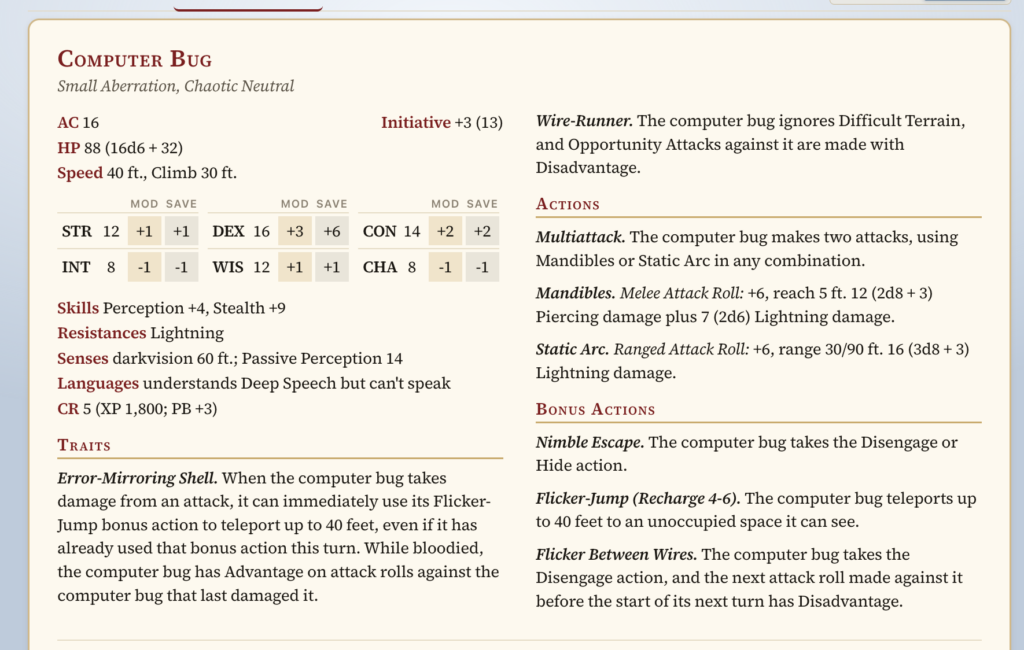
The extension connects directly to the monster statblocks you generate on cros.land and automatically fills out the Roll20 NPC/monster sheet for you. If you’ve ever typed one of those sheets in manually, you know how many fields there are. This speeds up the whole “get a homebrew creature into Roll20” process by a lot.

If you use Roll20, you can check it out here:
https://chromewebstore.google.com/detail/conjure-creature/oepoeaoeoaaedbgobaegpfamofhkbifo

And here’s a quick demo video showing it in action:

If you don’t use Roll20, no worries — this is just one more option in the toolbox. I’m aiming to make the ecosystem of tools as flexible as possible, and this felt like a natural next step.

If there are other platforms, tools, or workflows you think would pair well with what I’ve built, I’d love to hear your ideas. Integrations like this only exist because someone mentioned a pain point, so keep the suggestions coming.

Thanks as always for using the tools — more updates soon!

Filed Under: Dungeons And Dragons

The Tools Are Growing Up: Inline Editing + A Real Home Page

January 25, 2026 by Kenji Leave a Comment

Hey everybody, it’s been a while since I’ve made an update post, and I have a lot to share this time around. Because, while the stat block generator and the item generator had inline editing, I realized that in order for these tools to truly be of use to dungeon masters, they need to be more than generators — they need to be places where a DM can collaborate with the AI, modify outputs, and maintain a single source of truth for their creations: the settings they develop in the setting generator, the NPCs they build in the NPC generator, and the dungeons they construct in the dungeon generator.

So, after having battled some complexity on the back end, I managed to make something reasonably simple where people can click, edit, and essentially change any piece of information the tool produces. If a line of wording is off, or something needs just a bit of personal input or improvement, that can now be done directly in the interface. These changes have been implemented for the Setting Generator, the NPC Generator and the Dungeon Generator.

That shifts these tools from something that’s an interesting novelty — something that helps game masters brainstorm ideas — into something they can actually return to and reference for their campaigns. And that is really the goal moving forward.

I want to make sure each tool is as useful as possible. And while you’re free to maintain your own notes and your own campaign documents, I’m aiming to create a tool suite that’s useful and comprehensive enough that you can simply return to the site and reference what you’ve already created.

As a more personal update, these apps have shifted from being a side project to becoming my main focus. My contract ended in December, and after thinking about the current job market, the potential of these tools, and the amount of runway I have in savings, I’ve been doubling down on building this out. I’m still open to collaborations or job conversations — especially anything involving gaming or where gaming intersects with AI — but for now this project is my center of gravity.

Also, while this might be of less interest to long-time users, I’ve been more actively promoting the business, and part of that has meant creating a proper landing page — something clean, presentable, and easy to share, whether on Reddit, Facebook, or wherever people talk about their campaigns. The goal was to offer a better overview of everything in one place, a page people can send to friends without having to explain how all the pieces fit together.

Filed Under: Uncategorized

Back In the Game!

October 11, 2025 by Kenji Leave a Comment

It’s been a while since I’ve posted an update. The last time I added a feature was way back in January! A lot has been going on in life lately: my dad had triple bypass surgery (he’s doing better now), and on the brighter side, I fell in love, got engaged, and moved into a new house with my new family. It’s been a huge shift, and I’ve been adjusting to a lot of new rhythms.

But now that things are starting to settle down, I’m getting the itch to build again, and I’m happy to say I’m easing back into adding new features for the Dungeon Master apps.

Item Generator Updates

The Whispering Blade is a beautifully crafted longsword, its blade tapering to a finely honed point that glimmers like starlight. The hilt is woven with silver wire amidst deep azure leather, and the pommel is shaped like a crescent moon, adorned with tiny star-like gems that pulse faintly with a soft light. When the blade is drawn, a soft whispering can be heard, as if the weapon itself speaks reverberations of lost celestial echoes.

I spent the last couple of days giving the Item Generator app some love — it’s still the most popular app on my site, and I wanted to make sure it keeps earning that spot.

Here’s what’s new:

  • The generator is now more in line with D&D 5e rarity rules, so items feel a bit more balanced and true to the system.
  • There’s a new Edit Item button that lets you modify any part of a generated item — tweak names, stats, features, anything.
  • The Generate Feature button (for premium members) lets you re-roll or create new features for items you already like.
  • And now there’s a Quest Hooks tab! You can spin up quest hooks tied to an item — non-premium users get five per day, which should cover most DMs just fine.

If you haven’t checked out the Item Generator in a while, give it a spin — it’s running smoother and smarter than ever.

Life, Love, and Loot

Between hospitals, engagements, and moving boxes, it’s been a wild year. But I’m really excited to get back into a creative groove again.

I don’t plan on disappearing for as long as I did this time around. I’ve got a big backlog of feature requests from patrons, and I’m looking forward to tackling them one by one.

Come Say Hey on Discord

The Discord’s been a little quiet, probably because I’ve been quiet too, but I’d love to get the conversation going again.

If you’ve got a feature idea, want to talk about your campaign, or just want to say hello, hop in and let’s get things moving again.

Join the Discord

Thanks again to everyone supporting the project, especially my Patreon members: you’re the reason these tools keep growing.

I’ll be back soon with more updates. Until then, may your rolls be high and your inspiration points plentiful.

Kenji

Filed Under: Uncategorized

New Feature: Import-Export Functionality for Game Master Apps!

January 21, 2025 by Kenji Leave a Comment

One feature that people have been asking about for a while now is an import-export function. This allows users to share their data across browsers or back it up in case they decide to clear their cache. Since all the data is currently stored in the browser’s cache, this new functionality ensures your data is saved as a permanent file on your computer.

I’m excited to announce that I’ve added save-and-load functionality to the stat block generator, the dungeon generator 2.0, the magic item generator, the world-building dashboard, and the timeline generator—all in their premium versions. So yes, this is a premium feature. Free users can still use the apps just as they have been, but if you want the added benefit of saving your data, you can join my Patreon as a $5 patron. That gives you access to the premium versions of all the apps, along with this new feature.

While this save/load functionality can be used on any of the above apps, you can actually back up the data from all your apps in one place. I have just provided the functionality directly in the apps themselves. So, for example, you can go to the statblock generator and back up all statblocks as well as any magic items or dungeons you may have generated in other apps, and you can choose which of these apps you would like to back up as well.

I know this has been a long-awaited feature, and I’m happy to finally deliver it. If you have any questions, feel free to reach out.

A Quick Word of Caution

While I’m confident this feature works well—I’ve tested it thoroughly myself—I recommend doing a quick sanity check the first time you use it. To be extra safe, don’t immediately upload your saved file into the same browser where you generated it. Instead, download your data from your primary browser (like Chrome) and upload it into another browser (like Firefox) just to confirm everything is working correctly. This ensures that even if something unexpected happens, your data is still safe on another browser.

While the upload feature will overwrite existing app data, I haven’t seen any indication that it would erase everything. Still, better safe than sorry. Once you’ve confirmed it works, you’re good to go!

I hope you find this feature useful and, as always, let me know if you have any questions or feedback.

Filed Under: Dungeons And Dragons

Introducing: The New and Improved Dungeon Generator 2.0!

December 10, 2024 by Kenji 2 Comments

Screenshot of the dungeon generator. Clicking on a room number reveals the room description.

After months of hard work, I’m excited to share the second iteration of my dungeon generator tool. This version is a complete overhaul from the first, designed to meet the needs of Game Masters (GMs) who want to create dungeons quickly—within 10 minutes or less—while still having flexibility and depth.

Let me walk you through the features of this tool and how it works.

Dungeon Overview

The generator starts with a Dungeon Overview, which provides a summary of the dungeon, including its context within your greater setting. The input form for the overview accepts several optional parameters, so you can either customize the dungeon to fit your vision or go fully random. Here’s a breakdown of the key inputs:

  • Adjective: Describes the dungeon’s theme, like “forgotten” or “haunted.”
  • Type of Dungeon: Examples include “outpost” or “crypt.”
  • Place Name: Adds specificity, such as “Farwatch.”
  • Difficulty Tier: Choose from five tiers, ranging from Local Hero to Hero of the Realms, which influence the enemies and obstacles generated.
  • Additional Lore: Add any extra flavor or background details.

Map Generation

Once you’ve created the overview, you can generate a map. The maps are procedurally generated with randomized room sizes and layouts. If the initial map isn’t to your liking, you can regenerate it—but note that doing so will erase any content you’ve added so far.

Room Types and Features

Each dungeon includes several types of rooms to keep gameplay dynamic and engaging. Here are the core room types:

  1. Obstacle Room: Features a barrier that must be overcome to progress. The obstacle could be a locked gate, an illusion, or even a magical spell. The key to solving it doesn’t have to be a literal key—it could be a magical artifact, a piece of knowledge, or something else entirely.
  2. Key Room: Contains the solution to the obstacle room. The challenge here often involves combat, puzzles, or exploration. Key rooms are usually placed away from obstacle rooms to encourage players to explore.
  3. Setback Room: A room where failure results in a disadvantage for the party, such as a temporary debuff or loss of resources. By default, one setback room is included, but you can add more if you want to raise the stakes.
  4. Boss Room: This is where the dungeon’s main challenge resides. The generator suggests a location for the boss room, but you can assign it to any room you prefer if the recommendation doesn’t work for your layout.
  5. Secret and Locked Rooms:
    • Secret Rooms: Accessible only through hidden doors, adding a layer of mystery and reward for perceptive players.
    • Locked Rooms: Require locks to be picked or doors to be bashed down—simpler obstacles compared to full obstacle rooms.

NPC Integration

The tool also allows you to generate Non-Player Characters (NPCs). You can create a description for each NPC and optionally include them in room descriptions to add flavor or role-playing opportunities. NPCs might provide aid, present a challenge, or deepen the story.

Future Features

While I originally wanted to include stat blocks, I decided to focus on creating a minimum viable product for this release. Stat blocks can be added in a future update. For now, you can check out my existing stat block generator, which is linked in the tool itself.

Export Options

Once your dungeon is complete, you can export it in several formats:

  • Markdown for Homebrewery: Perfect for creating polished PDFs.
  • Hierarchical HTML: Great for integrating into digital tools or websites.
  • Plain Text: Simple and universal for quick sharing.

You can also download an image of the map for use in virtual tabletops or printouts.


I hope you enjoy using this tool as much as I enjoyed creating it! I’d love to hear your feedback, see the dungeons you build, and learn about the adventures that unfold because of it. This is just the beginning—I already have ideas for improvements and new features I’m working on.

Thank you for checking it out, and feel free to reach out with any thoughts or questions!

Filed Under: Dungeons And Dragons

  • Go to page 1
  • Go to page 2
  • Go to page 3
  • Interim pages omitted …
  • Go to page 12
  • Go to Next Page »

Primary Sidebar

Hello! My name is Kenji Crosland and welcome to my blog. I recently spent nearly a year traveling the Southern US looking for a new home. I also write about how to run pen and paper RPGs. I also make game master tools. Say hello!

Game Master Tools

  • D&D 5e Monster Statblock Generator
  • Dungeon Generator
  • D&D 5e Magic Item Generator
  • D&D 5e Encounter Generator
  • Worldbuilding Dashboard and Settings Generator
  • Location Description Generator
  • NPC Generator


Game Master Tools For Patrons

  • Bookshelf Generator
  • Lore and Timeline Generator
  • GM Dashboard and Town Generator

Recent Posts

D&D 5e Encounter Generator — Build Encounters Your Players Will Actually Remember

March 7, 2026 By Kenji

New Tool: Roll20 Statblock Auto-Fill Extension Now Available!

February 10, 2026 By Kenji

The Tools Are Growing Up: Inline Editing + A Real Home Page

January 25, 2026 By Kenji

Back In the Game!

October 11, 2025 By Kenji

New Feature: Import-Export Functionality for Game Master Apps!

January 21, 2025 By Kenji

Copyright © 2026 · Genesis Sample on Genesis Framework · WordPress · Log in