• Skip to primary navigation
  • Skip to main content
  • Skip to primary sidebar

cros.land

just figuring things out

  • Home
  • Kenji’s Dungeon Master Tools
  • Lost Mines of Phandelver Guide
  • Contact Me
  • Archives

Dungeons And Dragons

Notes on redesigning my D&D tool suite

July 18, 2026 by Kenji Leave a Comment

For about two years, every tool on this site was built with Cedar, the open-source design system I worked on while I was a software developer at REI. That was a deliberate choice and, for a long time, the right one. Cedar is accessible by default, thoroughly tested, and I knew every component in it. When you are one person shipping a suite of generators, starting from a design system you already know is worth an enormous amount. I got to spend my time on prompts and dungeon layouts instead of arguing with myself about button padding.

Then I started actually using the tools at my own table, and something kept bothering me.

Cedar is excellent. It was the wrong fit.

Cedar was built for outdoor ecommerce. It is bright and clean, and organized around getting someone from a product photo to a checkout button. Every one of those qualities is correct for selling tents. None of them are correct for a page a Dungeon Master reads at the table.

The tools were producing good content. A generated NPC would come back with a real personality, a distinct voice, a set of relationships worth playing. Then it rendered in a crisp sans-serif inside a card that could have been a shipping confirmation. The content said “sourcebook.” The interface said “SaaS dashboard.” Everything worked, and nothing felt like anything.

That gap matters more than it used to. There are a lot of AI tools now, and most of them look the same: the same neutral grays, the same rounded cards, the same interface you have seen a hundred times. When the underlying models are available to everyone, the thing that separates tools is whether they feel like they were made by a person who cared. Generic is a real liability.

Looking at manuscripts instead of websites

So I stopped looking at other apps for reference and decided to choose colors that would mimic a medieval manuscript. When I was doing this research two colors jumped out at me: Lapis Lazuli and Burgundy.

Lapis is the obvious one. Ultramarine was made by grinding lapis lazuli, a stone that came overland from Afghanistan, and it cost more than gold by weight. You did not spend it on ornament. You spent it on the things that mattered most. It carried importance because it was expensive enough to mean something.

Burgundy has an even more useful history for a designer. Red earth pigment was what scribes used for headings, initials, and instructions to the reader. The Latin for red earth is rubrica, which is where we get the word rubric. The red ink in a manuscript is literally the structural markup: this is a heading, this is where a new section begins, this is the part that tells you how to use the rest.

Once I saw that, the palette stopped being an aesthetic preference and became a rule I could actually build on.

Color has to mean something

The parchment system has one load-bearing rule, and everything else follows from it:

  • Burgundy is content. Titles, proper nouns, the names of things, the small-caps labels that structure a card. It is the rubric ink. If it is burgundy, it is part of what you are reading.
  • Lapis is the tool. Buttons, form labels, navigation, anything that belongs to the machinery rather than the document. If it is lapis, it is something you operate.
  • Red is destruction, and nothing else. Delete gets its own register so that a delete button can never be mistaken for a heading.

The practical effect is that you can tell what a thing does before you read it. That sounds small. In a suite where seven tools all produce dense text, it does an enormous amount of quiet work.

Surfaces followed the same logic. Everything you read sits on cream, the color of aged paper, and everything carries a very subtle paper grain: a CSS texture that mottles the cream the way real vellum ages unevenly. It runs at four percent opacity, which is low enough that most people never consciously notice it and high enough that removing it makes the whole page look flat. The chrome around the document stays clean. Texture belongs to the page you read, not the frame you hold it in.

The part that actually matters: readability

Here is the thing I did not expect. The redesign barely changed what the tools do. What it changed was how much work it takes to read them, and that turned out to be most of the value.

Some of what came out of the migration:

Two tiers of emphasis instead of one. My first pass made every emphasized term burgundy and bold. It looked great on an NPC description, where the emphasis lands on a few proper nouns. It fell apart completely on a magic item or an encounter, where a dozen mechanical values all want attention and the page turns into a thicket of bold burgundy. So emphasis split in two: burgundy bold for narrative anchors like names and factions, used two or three times a paragraph at most, and plain ink bold for mechanical values like AC, damage, and distances. Dense pages now read as prose with findable numbers.

Real type instead of faux bold. Everything you read is Source Serif 4 with genuine weight files loaded, so bold text is an actual bold cut rather than the browser smearing a regular one. It is the kind of thing nobody notices and everybody feels.

One card anatomy everywhere. Items, NPCs, settings, monsters, and factions all share a structure now, so learning to scan one teaches you all of them.

Editing where the content lives. Fields turn into inputs in place on the card. No modal, no separate form, no losing your place.

Loading states shaped like the content. Skeletons that match the card that is coming, so the page stops jumping around while a generation finishes.

Sentence case on every button. Small change, much calmer interface.

I also wrote acceptance tests as part of the migration rather than after it, which is not a glamorous detail, but redesigning seven tools at once without a safety net is how you ship a beautiful broken thing.

Writing it down

The last piece was documenting the whole thing. There is a file in the repository called parchment.md that describes the system as it actually exists, including the places where it is still inconsistent and my honest notes about which of those are worth fixing and which are special cases I had a reason for at the time.

That document is why the system holds together. Every time I sit down to build a new surface, the accumulated reasoning is right there instead of locked in my memory of a decision I made in June. When I added the statblock converter last week, it took about twenty minutes to make it look like it belonged, because the answer to every question it raised was already written down.

The tools do the same things they did before. They just finally look like they know what they are for.

Filed Under: Dungeons And Dragons

D&D 5e Encounter Generator — Build Encounters Your Players Will Actually Remember

March 7, 2026 by Kenji Leave a Comment

A quiet desert oasis rests beneath a scorching sun, its dark pool reflecting the harsh daylight and a ring of ten camels standing around it. Their bodies are lean and sunbaked, but their eyes hold an empty glaze, distant and unblinking as they sway subtly back and forth. At the pool’s edge, a massive fish-like shape shifts beneath the brackish surface — a hulking, ancient aboleth whose sickly glowing eyes scan without haste. The camels do not graze or drink; instead, they stand unnervingly still, occasionally twitching as if pulled by unseen strings. For a moment, the desert falls silent except for a faint ripple on the water’s surface — and then the gaze of the aboleth seems to reach toward you.

That encounter was generated by throwing an aboleth and ten camels into the generator with no other context. No location, no scene description, just those two creatures. The tool turned the camels into psychic hostages at a desert oasis. The aboleth bargains for servitude, the camels are the reason you can’t just fireball the pool, and the saddlebags link to a merchant house that opens a thread beyond the fight.

What Is This?

Most encounter builders are calculators. You pick monsters, they tell you the CR math, and you’re left to figure out the rest — what the monsters are doing when the party arrives, what happens mid-fight, and what the players find afterward.

This tool generates the actual encounter. You get read-aloud text to narrate to your players, DM notes with tactical positioning and terrain mechanics, a mid-encounter turn that shifts the stakes, and aftermath hooks that connect the fight to the wider campaign.

Pick your monsters, optionally describe a location or situation, and hit generate. That’s it.

How It Works

Every creature in the SRD has enriched data beyond what’s in the stat block. Each one has a tactical identity — how it fights as a whole, what combos it tries to execute. Each one has personality traits that shape the encounter’s tone. Some negotiate. Some flee when wounded. Some fight to the death without a word.

An aboleth negotiates because that’s what aboleths do — they’re ancient psychic manipulators who prefer servitude over destruction. A remorhaz just charges because it’s a mindless predator driven by heat and hunger. The encounters come from the creatures themselves, not from generic templates.

This is what makes the tool different from typing “generate a D&D encounter” into a chatbot. There’s a data layer underneath that knows how 328 SRD creatures behave, retreat, socialize, and what they leave behind when they’re defeated.

Custom Creatures

The tool also works with custom stat blocks. You can build your own creatures in the Statblock Generator and add them to encounters alongside SRD monsters.

When you create a custom creature, the tool automatically enriches it with the same tactical and personality data that the SRD creatures have. It reads the stat block’s abilities, checks the creature’s intelligence, and figures out how it should behave.

I tested this with a custom creature called the Plague Bellringer — a cursed undead with INT 6 that can’t stop ringing a necrotic bell. One of its abilities, Despairing Ring, mechanically forces nearby creatures to move closer in a compulsion to free it. The tool picked up on that flavor text and built the encounter around the party figuring out that the monster is asking for help, not threatening them. The bellringer isn’t a boss to kill — it’s a puzzle to solve.

Try It

The encounter generator is free to use with no account required. Pick some monsters, set the scene if you want, and see what it comes up with.

Try the Encounter Generator →

I’d love to hear what creature combos produce interesting results. The weirder the better — the whole point of the enriched creature data is that it should find a coherent relationship between any set of monsters you throw at it.

Filed Under: Dungeons And Dragons

New Tool: Roll20 Statblock Auto-Fill Extension Now Available!

February 10, 2026 by Kenji Leave a Comment

Quick update — I just released a new Chrome extension that some of you might find useful, especially if you run games on Roll20.

The extension connects directly to the monster statblocks you generate on cros.land and automatically fills out the Roll20 NPC/monster sheet for you. If you’ve ever typed one of those sheets in manually, you know how many fields there are. This speeds up the whole “get a homebrew creature into Roll20” process by a lot.

If you use Roll20, you can check it out here:
https://chromewebstore.google.com/detail/conjure-creature/oepoeaoeoaaedbgobaegpfamofhkbifo

And here’s a quick demo video showing it in action:

If you don’t use Roll20, no worries — this is just one more option in the toolbox. I’m aiming to make the ecosystem of tools as flexible as possible, and this felt like a natural next step.

If there are other platforms, tools, or workflows you think would pair well with what I’ve built, I’d love to hear your ideas. Integrations like this only exist because someone mentioned a pain point, so keep the suggestions coming.

Thanks as always for using the tools — more updates soon!

Filed Under: Dungeons And Dragons

New Feature: Import-Export Functionality for Game Master Apps!

January 21, 2025 by Kenji Leave a Comment

One feature that people have been asking about for a while now is an import-export function. This allows users to share their data across browsers or back it up in case they decide to clear their cache. Since all the data is currently stored in the browser’s cache, this new functionality ensures your data is saved as a permanent file on your computer.

I’m excited to announce that I’ve added save-and-load functionality to the stat block generator, the dungeon generator 2.0, the magic item generator, the world-building dashboard, and the timeline generator—all in their premium versions. So yes, this is a premium feature. Free users can still use the apps just as they have been, but if you want the added benefit of saving your data, you can join my Patreon as a $5 patron. That gives you access to the premium versions of all the apps, along with this new feature.

While this save/load functionality can be used on any of the above apps, you can actually back up the data from all your apps in one place. I have just provided the functionality directly in the apps themselves. So, for example, you can go to the statblock generator and back up all statblocks as well as any magic items or dungeons you may have generated in other apps, and you can choose which of these apps you would like to back up as well.

I know this has been a long-awaited feature, and I’m happy to finally deliver it. If you have any questions, feel free to reach out.

A Quick Word of Caution

While I’m confident this feature works well—I’ve tested it thoroughly myself—I recommend doing a quick sanity check the first time you use it. To be extra safe, don’t immediately upload your saved file into the same browser where you generated it. Instead, download your data from your primary browser (like Chrome) and upload it into another browser (like Firefox) just to confirm everything is working correctly. This ensures that even if something unexpected happens, your data is still safe on another browser.

While the upload feature will overwrite existing app data, I haven’t seen any indication that it would erase everything. Still, better safe than sorry. Once you’ve confirmed it works, you’re good to go!

I hope you find this feature useful and, as always, let me know if you have any questions or feedback.
Filed Under: Dungeons And Dragons

Introducing: The New and Improved Dungeon Generator 2.0!

December 10, 2024 by Kenji 2 Comments

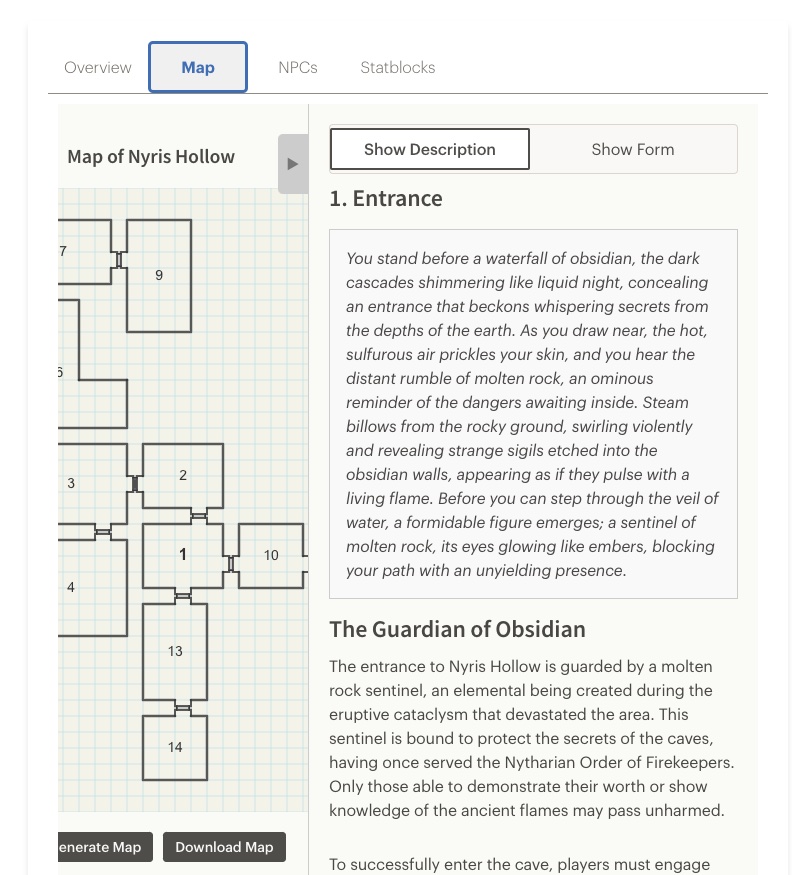
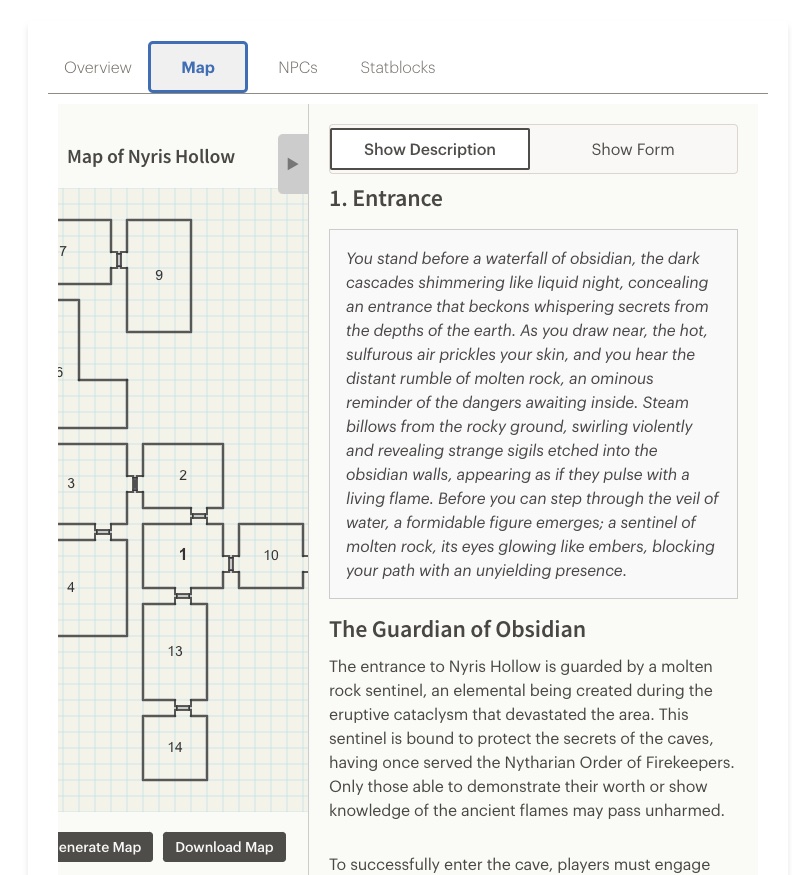
Screenshot of the dungeon generator. Clicking on a room number reveals the room description.

After months of hard work, I’m excited to share the second iteration of my dungeon generator tool. This version is a complete overhaul from the first, designed to meet the needs of Game Masters (GMs) who want to create dungeons quickly—within 10 minutes or less—while still having flexibility and depth.

Let me walk you through the features of this tool and how it works.

Dungeon Overview

The generator starts with a Dungeon Overview, which provides a summary of the dungeon, including its context within your greater setting. The input form for the overview accepts several optional parameters, so you can either customize the dungeon to fit your vision or go fully random. Here’s a breakdown of the key inputs:

  • Adjective: Describes the dungeon’s theme, like “forgotten” or “haunted.”
  • Type of Dungeon: Examples include “outpost” or “crypt.”
  • Place Name: Adds specificity, such as “Farwatch.”
  • Difficulty Tier: Choose from five tiers, ranging from Local Hero to Hero of the Realms, which influence the enemies and obstacles generated.
  • Additional Lore: Add any extra flavor or background details.

Map Generation

Once you’ve created the overview, you can generate a map. The maps are procedurally generated with randomized room sizes and layouts. If the initial map isn’t to your liking, you can regenerate it—but note that doing so will erase any content you’ve added so far.

Room Types and Features

Each dungeon includes several types of rooms to keep gameplay dynamic and engaging. Here are the core room types:

  1. Obstacle Room: Features a barrier that must be overcome to progress. The obstacle could be a locked gate, an illusion, or even a magical spell. The key to solving it doesn’t have to be a literal key—it could be a magical artifact, a piece of knowledge, or something else entirely.
  2. Key Room: Contains the solution to the obstacle room. The challenge here often involves combat, puzzles, or exploration. Key rooms are usually placed away from obstacle rooms to encourage players to explore.
  3. Setback Room: A room where failure results in a disadvantage for the party, such as a temporary debuff or loss of resources. By default, one setback room is included, but you can add more if you want to raise the stakes.
  4. Boss Room: This is where the dungeon’s main challenge resides. The generator suggests a location for the boss room, but you can assign it to any room you prefer if the recommendation doesn’t work for your layout.
  5. Secret and Locked Rooms:
    • Secret Rooms: Accessible only through hidden doors, adding a layer of mystery and reward for perceptive players.
    • Locked Rooms: Require locks to be picked or doors to be bashed down—simpler obstacles compared to full obstacle rooms.

NPC Integration

The tool also allows you to generate Non-Player Characters (NPCs). You can create a description for each NPC and optionally include them in room descriptions to add flavor or role-playing opportunities. NPCs might provide aid, present a challenge, or deepen the story.

Future Features

While I originally wanted to include stat blocks, I decided to focus on creating a minimum viable product for this release. Stat blocks can be added in a future update. For now, you can check out my existing stat block generator, which is linked in the tool itself.

Export Options

Once your dungeon is complete, you can export it in several formats:

  • Markdown for Homebrewery: Perfect for creating polished PDFs.
  • Hierarchical HTML: Great for integrating into digital tools or websites.
  • Plain Text: Simple and universal for quick sharing.

You can also download an image of the map for use in virtual tabletops or printouts.


I hope you enjoy using this tool as much as I enjoyed creating it! I’d love to hear your feedback, see the dungeons you build, and learn about the adventures that unfold because of it. This is just the beginning—I already have ideas for improvements and new features I’m working on.

Thank you for checking it out, and feel free to reach out with any thoughts or questions!

Filed Under: Dungeons And Dragons

Announcement: Adding Daily Usage Limits to Statblocks

April 15, 2024 by Kenji Leave a Comment

In January, I was laid off from my position as a software developer at REI. Since then, I’ve dedicated more time to developing my AI-powered Game Master tools, which started as a passion project. To support this endeavor, I started a Patreon to help cover the costs associated with ChatGPT API calls, without focusing much on monetization initially. However, as I pouring more effort into these tools, I’m shifting towards a freemium model.

This change hasn’t been implemented yet, but I want to share what you can expect. The most popular app, the D&D 5e Statblock Generator, which use templates from D&D 5th edition SRD monsters, will soon have a daily usage limit. Users will be able to generate up to five statblocks per 24-hour period. This limit should accommodate the average user based on my surveys, which show most generate zero to five statblocks weekly.

For those who need more extensive access, a subscription at the $5 or Master Worldshaper level will remove this limit. This adjustment also allows me to potentially make other tools, like the dungeon generator, free for all users while reserving more complex features, like enhanced statblock generation for the npcs that appear in the dungeons, for patrons.

These changes are designed to strike a balance between making the tools accessible and supporting their continued development and my livelihood. If you are excited about these updates or if you’re connected to software development opportunities, please do not hesitate to reach out. My LinkedIn address is here: https://www.linkedin.com/in/kenjicrosland/. I am also eager to hear your feedback and ideas for future enhancements to the Game Master tools.

Thank you for your ongoing support and enthusiasm for the apps.

Filed Under: Dungeons And Dragons, Personal Stories, Technology and Tech Startups

  • Go to page 1
  • Go to page 2
  • Go to page 3
  • Go to page 4
  • Go to Next Page »

Primary Sidebar

Hello! My name is Kenji Crosland and welcome to my blog. I recently spent nearly a year traveling the Southern US looking for a new home. I also write about how to run pen and paper RPGs. I also make game master tools. Say hello!

Player Tools

  • D&D 5e Inventory Manager
  • D&D 5e Loot Splitter


Game Master Tools

  • D&D 5e Monster Statblock Generator
  • 2014 to 2024 Statblock Converter
  • Dungeon Generator
  • D&D 5e Magic Item Generator
  • D&D 5e Magic Item Price Calculator
  • D&D 5e Encounter Generator
  • D&D 5e Chase Tracker
  • Worldbuilding Dashboard and Settings Generator
  • Location Description Generator
  • NPC Generator


Game Master Tools For Patrons

  • Bookshelf Generator
  • Lore and Timeline Generator

Recent Posts

2024 rules support, and the rebuild underneath it

July 30, 2026 By Kenji

Notes on redesigning my D&D tool suite

July 18, 2026 By Kenji

Your Tools Now Talk to Each Other

March 26, 2026 By Kenji

D&D 5e Encounter Generator — Build Encounters Your Players Will Actually Remember

March 7, 2026 By Kenji

New Tool: Roll20 Statblock Auto-Fill Extension Now Available!

February 10, 2026 By Kenji

Copyright © 2026 · Genesis Sample on Genesis Framework · WordPress · Log in